
How to Reset Your Garage Door Opener (The Easiest Way)
Remote stopped working, opener acting up after a power outage, or just moved into a new Ottawa home? Most garage door openers can be reset in under two minutes with one button on the motor unit. Here’s how to do it for Chamberlain, LiftMaster, Craftsman, Genie and older DIP-switch openers, and what to do if a reset doesn’t fix it.
✓ Same-day opener repair in Ottawa ✓ Free on-site estimate ✓ All major brands
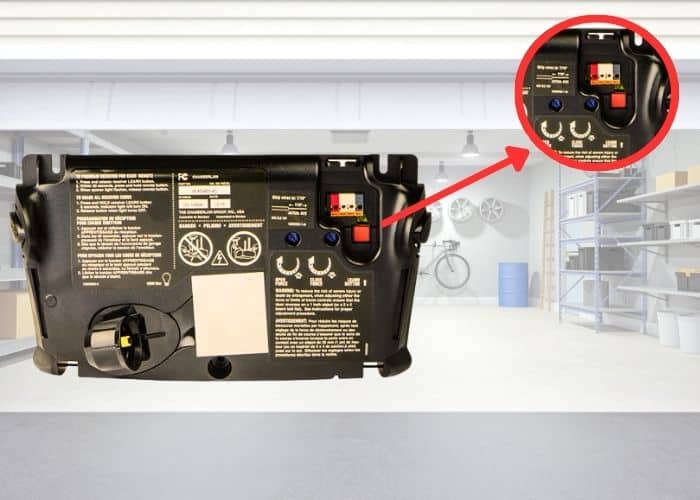
The Easiest Way to Reset a Garage Door Opener
The easiest way to reset a garage door opener is to clear its memory with the Learn button, then pair your remote again:
- Find the Learn button on the back or side of the motor unit, usually next to the hanging antenna wire. You may need to remove the light cover.
- Press and hold it for 6 to 10 seconds, until the small LED next to it goes out. This erases every remote and keypad from the opener.
- Press and release Learn once, then press your remote button within 30 seconds. The opener lights blink or you hear a click when it pairs.
Which Reset Does Your Opener Need?
“Reset” means different things depending on what’s wrong. Find your symptom, then follow the matching steps below.
| What's happening | Reset you need | Time |
|---|---|---|
| One remote stopped working, the others still work | New battery, then re-pair that remote | 2 min |
| You moved in, lost a remote, or a remote was stolen | Full memory wipe with the Learn button | 5 min |
| Opener is dead or erratic after a power outage | Power reset (unplug or flip the breaker) | 2 min |
| Door starts closing, then reverses, and the lights blink | Safety sensor reset | 5 min |
| Wall button works but no remote does | Turn off Lock / Vacation mode on the wall control | 10 sec |
| Door was opened by hand with the red cord | Re-engage the trolley | 1 min |
| Door stops short or won't close all the way | Travel limit / force reset | 10 min |
Where Is the Reset Button on a Garage Door Opener?
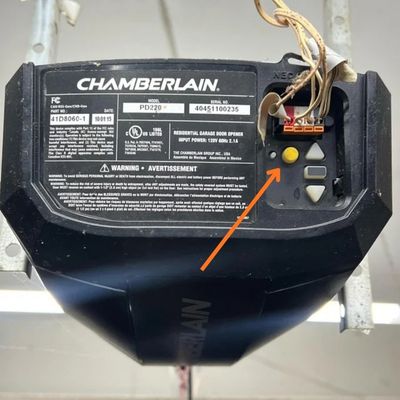
Most openers don’t have a button labelled “reset”. The button you’re looking for is the Learn button (Chamberlain, LiftMaster, Craftsman) or the Learn Code / Program button (Genie, Overhead Door). It’s a small square button on the motor unit hanging from your garage ceiling, usually on the back panel beside the antenna wire, sometimes behind the light cover.
On Chamberlain-family openers, the colour of the Learn button tells you which remotes will work with it:
| Learn button colour | Technology | Roughly made |
|---|---|---|
| Yellow | Security+ 2.0 | 2011 – today |
| Purple | Security+ 315 MHz | 2005 – 2014 |
| Red / orange | Security+ 390 MHz | 1997 – 2005 |
| Green | Billion Code 390 MHz | 1993 – 1996 |
No Learn button at all? Your opener probably uses DIP switches (see below), or it’s old enough that replacing it is safer than resetting it.
How to Reset a Garage Door Opener by Brand
The steps are close across brands, but the button names and timing differ. Check the label on the motor unit if your model doesn’t match what you see here.
Chamberlain Garage Door Opener Reset
- Press and hold the Learn button about 6 seconds, until the LED goes out. All remotes and keypads are erased.
- Press and release Learn. The LED lights up for 30 seconds.
- Press and hold the remote button until the opener lights blink or you hear two clicks.
- Repeat steps 2 and 3 for each remote and the keypad.
myQ Wi-Fi models: after a full reset, re-add the opener in the myQ app.
LiftMaster Reset
LiftMaster is made by Chamberlain, so residential LiftMaster openers reset exactly the same way: hold Learn until the LED goes out, then press Learn once and pair each remote.
Commercial LiftMaster operators (like the MH hoist) use a different control board. Call us before resetting one.
Craftsman Garage Door Opener Reset Button
Craftsman openers are also built by Chamberlain. Use the Learn button on the back of the motor unit and follow the Chamberlain steps. The button colour table above applies.
Genie and Overhead Door Reset
- Press and hold the Learn Code (or Program) button until the LED turns off, about 10 seconds, to erase all remotes.
- Press and release the button again. The LED flashes or stays lit.
- Press your remote button. On many models you press it a second time to confirm. The opener light blinks when paired.
Mastercraft and Canadian Tire Openers
Most openers sold at Canadian Tire also use a Learn button, and the pairing steps are printed on a label inside the light cover. If you bought yours there and need it installed or reprogrammed, see our Canadian Tire garage door opener installation page.
Older Openers with DIP Switches
- Unplug the opener. Open the motor’s light cover and find the row of 8 to 12 small switches.
- Open the remote’s battery cover to find its matching row of switches.
- Set both to the same new up/down pattern. Don’t use the factory pattern (all in the middle or all up).
- Plug the opener back in and test the remote.
DIP-switch openers are easy to copy. If yours is from the early 90s, a new opener is the real security fix.
How to Reset a Garage Door Opener After a Power Outage
Ottawa sees its share of outages, from summer windstorms to January freezing rain. When the power comes back, a surge can leave the opener’s logic board confused: the light stays on, the door ignores the remote, or the unit beeps. A power reset clears it.
- Unplug the opener from the ceiling outlet, or switch off its breaker in the panel.
- Wait 60 seconds so the board fully drains.
- Plug it back in and run the door through one full open and close with the wall button.
- Test each remote. If one doesn’t respond, re-pair it with the Learn button.
If your opener has a battery backup and beeps every 30 seconds after an outage, the battery is weak. That’s a battery replacement, not a reset.
Other Garage Door Resets You Can Do Yourself
Reset Garage Door Sensors
If the door reverses and the opener lights blink, the safety sensors can’t see each other.
- Wipe both lenses (cobwebs, snow and road-salt spray are common in Ottawa).
- Check that both LEDs are solid. A blinking or dark LED means misalignment.
- Loosen the wing nut, aim the sensors at each other until both LEDs are solid, then tighten.
Door only fails in the afternoon? It’s sun glare: see garage door won’t close in sunlight.
Turn Off Lock (Vacation) Mode
If the wall button works but every remote is dead, someone probably pressed Lock on the wall control. The Lock light usually blinks. Press and hold the Lock button for about 2 seconds until the light stops flashing.
More on this: remote only works inside the garage.
Reset After Using the Manual Release
After pulling the red emergency cord, the door is disconnected from the opener. Close the door by hand, then press the wall button. The trolley travels along the rail and clicks back into place.
Travel Limit and Force Reset
If the door stops a few inches short or reverses when it touches the floor, the travel limits need adjusting. Newer openers use up/down arrow buttons; older ones use dials. Setting the force too high can defeat the safety reverse, so if you’re not sure, have a technician do it.
Why Ottawa Garage Door Openers Need Resetting More Often
Cold kills remote batteries
At -25°C, a weak remote battery that worked in October stops working in January. Always try a new battery before resetting anything.
Stiff grease trips the force setting
Cold thickens the grease on rollers and hinges. The opener works harder, hits its force limit and reverses, which looks like a fault but is a lubrication problem.
Ice and snow on the sensors
Snow blown into the garage and frost on the lenses block the beam. Clear them before you try a sensor reset.
Outages and surges
Storm outages and power surges are the most common reason an opener loses its settings. A surge protector on the opener outlet is cheap insurance.
Neighbour’s remote opening your door? A full Learn-button wipe fixes it: here’s why it happens.

When a Reset Doesn't Work: Opener Repair Costs in Ottawa
If you’ve reset the opener and it still won’t respond, the problem is usually a part. These are our typical prices in Ottawa, and the on-site estimate is free.
| Problem | Usual fix | Typical cost (CAD) |
|---|---|---|
| Remotes won't pair even after a full wipe | Logic board replacement | $220 – $380 |
| Motor hums but the door doesn't move | Gear and sprocket kit | $180 – $320 |
| Door reverses, sensors won't align | Sensor alignment and cleaning | $85 – $180 |
| General opener fault | Opener repair | $220 – $450 |
| Remotes or keypad programmed for you | Remote programming visit | [ADD YOUR PRICE] |
| Opener is 15+ years old or uses DIP switches | New belt-drive opener, installed | $550 – $950 |
After-hours calls add $60 – $120. Full breakdown on our garage door repair costs page.
Reset It Yourself or Call a Technician?
Safe to do yourself
- Replacing remote batteries
- Learn-button memory wipe and re-pairing
- Power reset after an outage
- Cleaning and aligning sensors
- Turning off Lock mode
Call us
- Opener hums, grinds or clicks but the door won’t move
- Door is crooked, a cable is loose, or a spring looks broken
- Force or travel limits need adjusting on a heavy door
- Nothing pairs even after a full reset
- Commercial operators and hoists
Never reset or run an opener if a spring or cable is broken. The opener isn’t built to lift the full weight of the door. See garage door opener repair.
Garage Door Opener Help Across Ottawa
If a reset doesn’t fix it, we come to you the same day in:
Garage Door Opener Reset FAQ
Is there a reset button on a garage door opener?
Usually not one labelled “reset”. The Learn button on the motor unit does the job: hold it until the LED goes out to erase all remotes, then press it once to pair them again. Some battery-backup and Wi-Fi models have a separate reset, shown on the label inside the light cover.
Where is the reset button on a Chamberlain garage door opener?
On the back or side of the motor unit, next to the antenna wire. It’s a square button in yellow, purple, red/orange or green. On some models you have to take off the light cover to reach it.
How long do you hold the reset button on a garage door opener?
About 6 seconds on Chamberlain, LiftMaster and Craftsman openers, and about 10 seconds on Genie, until the LED next to the button goes out.
Does unplugging a garage door opener reset it?
Unplugging for 60 seconds resets the logic board and clears glitches after an outage. It does not erase your remotes. To erase remotes, use the Learn button.
How do I reset my garage door sensors?
Clean both lenses, check that both sensor LEDs are solid, and adjust the brackets until they point straight at each other. Then run the door with the wall button.
Why did my garage door opener stop working after a power outage?
A surge can scramble the logic board or the travel limits. Unplug the opener for 60 seconds, plug it back in, and run it once with the wall button. If it still won’t work, the logic board may need replacing.
Should I reset my opener after moving into a new house?
Yes. The previous owners, contractors and neighbours may still have working remotes. Erase the memory with the Learn button and pair only the remotes you have.
Reset Didn't Work? We'll Fix Your Opener Today.
Ottawa Garage Doors & Openers repairs and reprograms Chamberlain, LiftMaster, Genie, Craftsman and Mastercraft openers across Ottawa, 7 days a week. Free on-site estimate.